Account statistics for all cards can be viewed in the “Home” section.
There are several dashboards here.
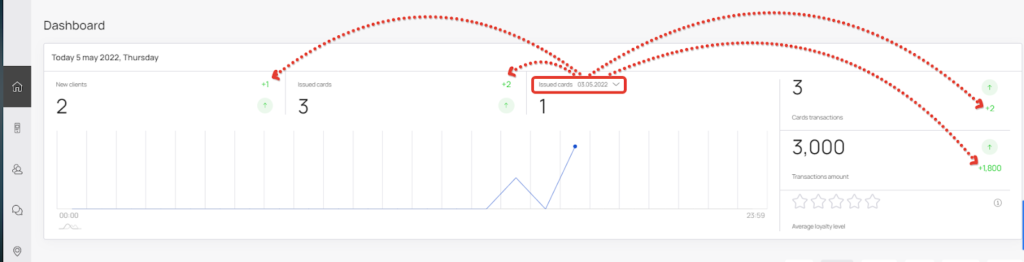
The first dashboard displays general information for the current day:
- New clients – how many customers installed cards today.
- Issued cards – how many cards were installed by clients.
- Issued cards for the previous period (you can select a specific day) – how many cards were installed by customers for the selected day.
- Cards transactions.
- Transactions amount
- Average loyalty level
Also, you can see the change of indicators compared to the previous period in the table.
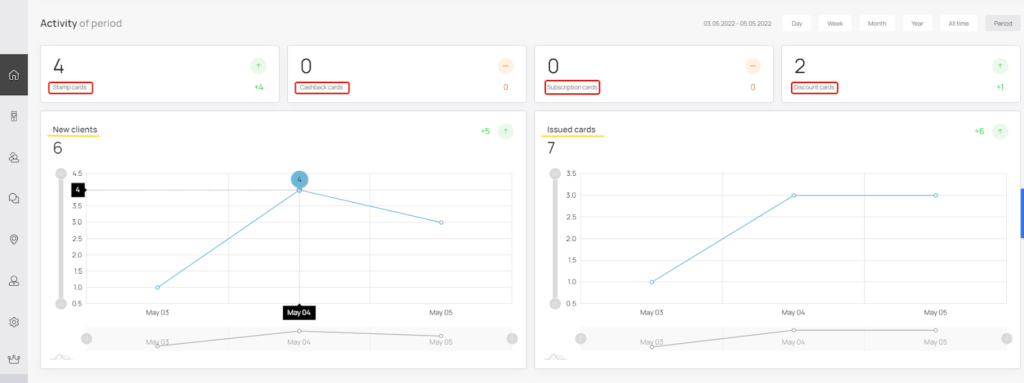
Customer Activity Dashboard #
Shows statistics on all cards and clients in the form of charts, where you can select different periods: day, week, month, year, the whole period and set up the period yourself.
This section displays the number of installed cards by their type, as well as two graphs: new customers and how many cards were issued.
Dashboard “Referral program”. #
In this section you can see the statistics on the referral program for the selected period.
The table shows the following indicators:
- Clients share cards
- Installed cards by referral program
- Clients came by referral program
- Profit from the referral program

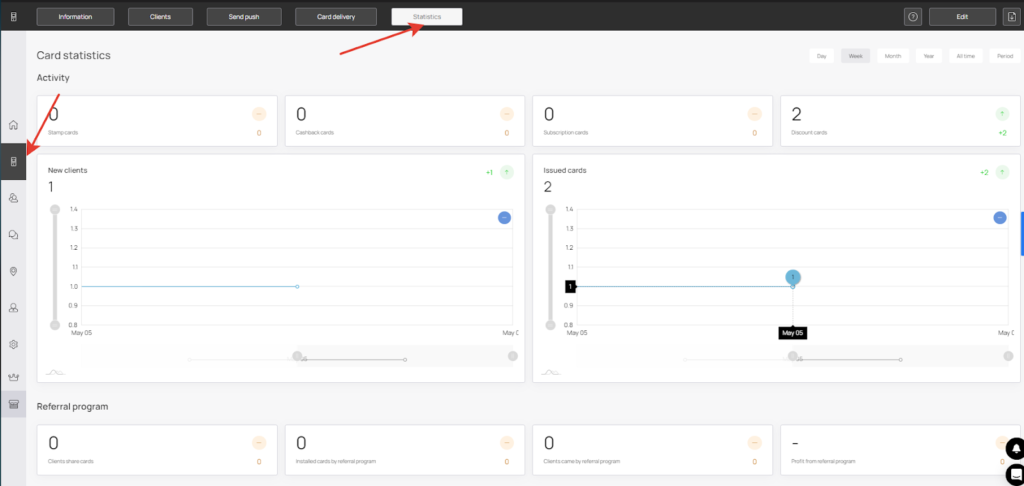
Also, if you go to the “Cards” section, choose the card you are interested in and go to the “Statistics” tab, you can see statistics similar to the one in the “Home” section, but for the selected loyalty card.